
Share with your community


ERP for production planning is the practice of using enterprise resource planning software to schedule manufacturing work against live inventory, capacity, and demand data. Unlike spreadsheets or standalone MRP tools, ERP keeps planning and execution inside one connected system, the kind of consolidation a system migration is usually meant to achieve. Related concepts include adaptive scheduling, capacity planning, and work order management. All three depend on the same real-time data foundation.
Traditional scheduling fails because it assumes conditions stay fixed after the plan is built. A monthly schedule gets frozen, then handed to the floor. Reality does not stay still. Something changes almost every shift.
Four conditions break a static schedule again and again:
Industry research consistently identifies these disruptions, unplanned downtime, material shortages, and rush-order rework as leading causes of missed delivery dates in discrete manufacturing. Each one forces a person to manually rebuild the schedule. That process is slow, and it usually happens after the damage is already done.
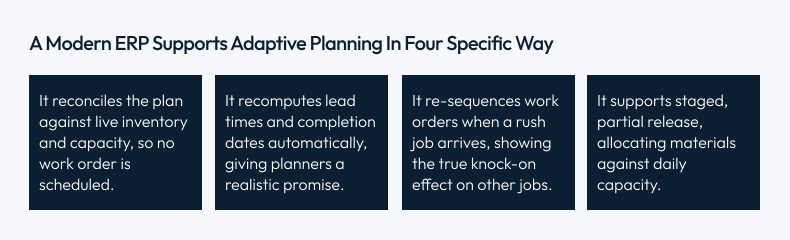
Adaptive planning in manufacturing treats the schedule as a living model, not a fixed document, the same principle behind building digital twins of physical operations. Machine status, material availability, labor capacity, and order priority all become live inputs. When one input changes, the plan recalculates immediately.
Example: A tier-1 supplier reports a 48-hour shipment delay at 6 a.m. On a static schedule, nobody knows until the line physically runs out of material. With adaptive ERP planning, the delay is logged once. The system immediately flags the affected work orders. It identifies which jobs can still run with material on hand. It re-sequences the floor before the shortfall stops production.
“The plan should describe what can happen right now, not what should happen in a perfect world. That single shift in mindset is what adaptive planning delivers.” – Principal Manufacturing Consultant, Synkrone8
Work order management is the process of turning a production plan into a specific, buildable instruction for the floor. ERP implementation automates this conversion from demand signal to actionable job.
A confirmed sales order or a forecast-driven planning run triggers the ERP to generate a work order automatically. Quantities, due dates, and priorities carry over without manual re-entry. This single link removes one of the most common sources of manufacturing error: information lost in the handoff between “sold” and “made.”
A work order is only reliable when three elements are linked and validated together:
| Element | What It Provides | Risk If Missing |
|---|---|---|
| Bill of Materials (BOM) | Current, correct component list and revision | Operators build against the wrong parts |
| Routing | Sequence of operations, workstations, standard times | Supervisors map the job by hand |
| Inventory allocation | Reserved stock, checked at work order creation | Jobs release against material that is not there |
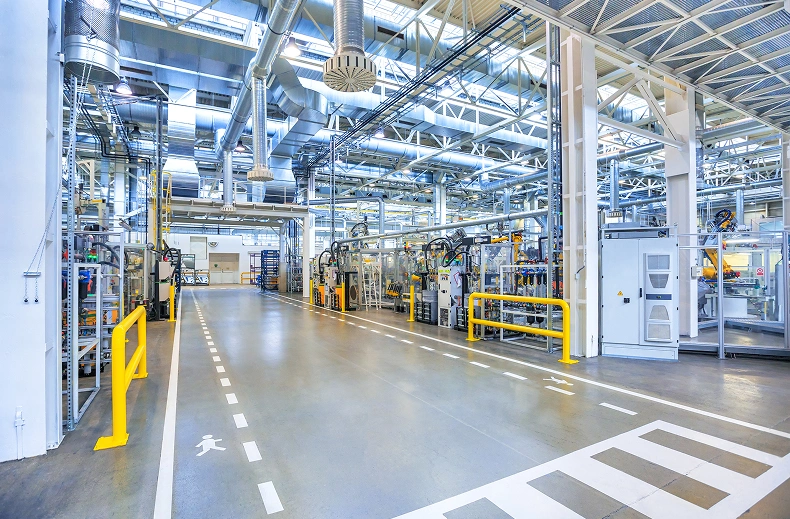
A shop floor control system, built on the same ISA-95 framework that governs how plant-floor
execution and business systems exchange data, is the mechanism that delivers work order instructions to operators and captures execution data back in real time. Without it, even a well-planned work order goes dark the moment it becomes a printed sheet.
Paper job cards carry four hidden costs:
Digital job cards move the same instructions to a tablet or mobile device at the workstation, typically as part of a broader IIoT and smart manufacturing rollout. Four capabilities close the visibility gap:
In a Synkrone8 engagement with a German pharmaceutical manufacturer, real-time execution tracking contributed to a 28% reduction in expiry-related losses (Synkrone8 Case Study, 2024).
Connecting planning and execution produces four measurable outcomes:
In one Synkrone8 engagement, a European manufacturer reduced unplanned downtime by 40% after implementing adaptive, ERP-driven production planning (Synkrone8 Case Study, 2024).
MRP calculates material requirements from a bill of materials and a schedule. ERP includes MRP but also connects finance, inventory, and shop floor execution in one system. ERP recalculates the plan continuously, while standalone MRP often runs in scheduled batches.
Adaptive planning is a scheduling approach that recalculates automatically as machine status, material supply, and order priorities change. It replaces a fixed, frozen schedule with a live model that updates in real time.
A digital job card is an electronic version of a paper work instruction, delivered to a tablet or device at the workstation, usually as part of a smart manufacturing deployment. It captures start, pause, and completion times, scanned material data, and labor hours automatically.
ERP reduces WIP by releasing work orders against real capacity and confirmed material availability, instead of pushing jobs into the system based on forecast alone. This keeps partially built jobs from piling up ahead of a bottleneck.
Yes. A modern ERP re-sequences affected work orders automatically when a rush order enters the system. It shows the knock-on effect on other jobs before the change is committed.
Any manufacturer running more than a handful of concurrent work orders benefits from adaptive planning. The disruptions that break static schedules, downtime, material delays, and rush orders affect operations of every size.
Timelines vary by scope. A focused rollout covering work orders, routing, and digital job cards can typically go live in a phased approach over several months, separate from a full ERP replacement.
Disruptions do not disappear in a connected factory. What changes is whether they cascade into chaos. ERP for production planning replaces the morning guess with a live, adaptive schedule. Validated work order management makes every job buildable before release. Digital job cards and real-time shop floor control close the loop, turning execution into data leadership that can actually be seen.
The gap between a plan and a floor is measurable. Ask how often your schedule is still accurate by the end of a shift. Ask how long it takes for a supplier delay to reach the plan. If those answers are uncomfortable, that gap is costing more than it appears to.
Ready to close that gap? Request a demo or talk to the Synkrone8 team about assessing your current production planning and shop floor control setup. See how other manufacturers closed it in our case studies, or browse the blog for more on ERP-driven manufacturing.
Written by

Synkrone8 is a group of manufacturing IT specialists, ERP consultants, and smart-factory engineers who turn shop-floor challenges into connected, data-driven operations. They write about Industry 4.0, ERP, IIoT, and digital transformation drawn from real implementation experience.
Discover more insights, trends, and stories from our experts.

ERP
FMCG
In most industries, a production plan that's a little off costs you some efficiency. In...
8 Min Read
05, Oct 2026

ERP
In this guide, we break down the ERP vs CRM debate in plain language, what...
12 Min Read
05, Aug 2026

ERP
ERP (Enterprise Resource Planning) is software that integrates a company's core business processes, finance, inventory,...
6 Min Read
01, Jun 2026
Book a free 30-minute discovery call with one of our manufacturing consultants. No pitch. No pressure. Just an honest conversation about what's possible for your operation.