
Share with your community


Zoho CRM is a cloud-based customer relationship management system that centralizes sales pipelines, customer contacts, deal tracking, and communication history into one platform. Businesses that implement Zoho CRM with a structured setup reduce manual data entry by up to 70% and achieve full ROI within 6–10 months, according to Synkrone8 delivery data (2025).
Zoho CRM is a cloud-based customer relationship management (CRM) platform developed by Zoho Corporation. It centralizes everything a business knows about its customers and prospects — contacts, deals, emails, calls, quotes, and support history, into a single shared system.
Zoho CRM sits within the broader Zoho ecosystem of 50+ integrated business applications. These include Zoho Books (accounting), Zoho Desk (customer support), Zoho Campaigns (email marketing), Zoho Inventory (stock management), and Zoho Analytics (business intelligence). Manufacturers and industrial businesses benefit especially from this ecosystem — because sales, inventory, production, and finance data can flow across one connected platform rather than across disconnected vendor systems.
Zoho CRM includes a large feature set. The modules below drive the majority of measurable business value for sales teams and operations-led businesses.
Zoho CRM converts every inbound enquiry into a tracked lead. Leads are qualified, scored, and converted into contacts and deals, carrying a full interaction history through every stage. No prospect falls through the cracks because the record exists independently of any individual salesperson’s inbox.
Zoho CRM supports multiple sales pipelines with custom stages. A manufacturing business can run a long-cycle capital equipment pipeline alongside a fast-moving consumables pipeline, each with appropriate stages, probability weightings, and close-date forecasts. According to Zoho’s 2024 product documentation, users can configure unlimited pipelines on Enterprise and Ultimate editions.
Workflow automation in Zoho CRM eliminates repetitive manual tasks. Rules trigger automatically when defined conditions are met: assign a new lead to the right rep, send a follow-up email after 48 hours of silence, create a task when a deal moves to the proposal stage. Synkrone8 client deployments show that correctly configured Zoho CRM workflow automation reduces manual data entry by 70% within the first 90 days of live operation.
Blueprint is Zoho CRM’s sales process enforcement engine. Blueprint maps your defined sales process onto the CRM interface, requiring reps to complete specific actions before advancing a deal to the next stage. This prevents skipped steps, incomplete records, and inconsistent pipeline data. Blueprint is available from the Professional edition upward.
Zia is Zoho CRM’s built-in AI assistant. Zia provides lead scoring, deal-win probability predictions, anomaly detection in sales trends, and recommendations on the optimal time to contact a prospect. Zia’s predictions improve in accuracy as the volume of historical CRM data increases. Full Zia functionality is available on Enterprise and Ultimate editions.
Zoho CRM’s analytics module produces real-time reports on conversion rates, sales cycle length, pipeline velocity, and revenue forecasts. Dashboards are role-configurable: a sales rep sees their own pipeline; a sales manager sees team performance; an operations director sees cross-functional KPIs. Zoho Analytics (a separate but natively integrated application) extends this into full business intelligence territory.
Zoho CRM captures customer interactions across email, phone, live chat, social media, and web forms — all attached to the relevant contact and deal record. This means a customer’s complete history is visible regardless of which channel they used or which team member they spoke to last.
Zoho CRM is available in five editions. Each tier adds capability. The table below summarizes what each plan delivers.
| Edition | Price (per user/month, billed annually) | Key Capabilities |
|---|---|---|
| Free | $0 (up to 3 users) | Leads, contacts, deals, basic tasks, standard reports |
| Standard | ~$14 | Scoring rules, multiple pipelines, basic automation, email templates |
| Professional | ~$23 | Blueprint, inventory management, advanced workflow rules, web-to-lead forms |
| Enterprise | ~$40 | Zia AI, multi-user portals, territory management, advanced customization, Canvas |
| Ultimate | ~$52 | Enhanced analytics, higher API limits, premium Zia features |
Pricing in USD. Billed annually. Verify current pricing before purchasing, as Zoho updates pricing periodically.
Synkrone8’s recommendation for manufacturing and industrial SMEs: start on Professional, upgrade to Enterprise when Zia’s AI and territory management become operationally relevant. Overbuying upfront is a common mistake that inflates costs without increasing usage.
Zoho CRM setup fails when businesses configure the software before defining their process. The correct sequence is always: process first, configuration second. Synkrone8 deploys Zoho CRM across manufacturing, logistics, and retail businesses in 4-6 months using the structured methodology below.
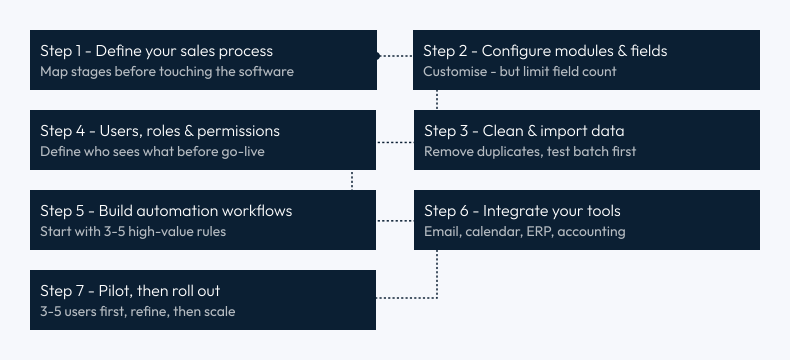
Deploying Zoho CRM is the beginning. The businesses that sustain high ROI from the Zoho CRM system 12-24 months after go-live share a consistent set of operating disciplines.
Agree on naming conventions, mandatory fields, and a team-wide rule: a deal does not exist until it is in the CRM. Run a deduplication and data audit every quarter. According to Salesforce’s State of CRM Report (2023), poor data quality is the leading reason sales teams stop trusting their CRM, and a CRM teams don’t trust its CRM is a CRM teams stop using.
Automate data entry, task creation, lead routing, and follow-up reminders. Do not attempt to automate relationship judgment or complex negotiations. The goal of automation is to free sales reps for higher-value conversations, not to eliminate them.
Build one dashboard that each rep opens every morning, and one dashboard that each manager reviews every week. Dashboards that drive daily decisions improve pipeline hygiene and forecast accuracy. Dashboards used only for monthly reporting have no behavioral impact.
Blueprint is consistently underused in Zoho CRM deployments. It prevents reps from skipping qualification steps, submitting incomplete records, or advancing deals without required sign-offs. For manufacturing businesses running long sales cycles with multiple stakeholders, Blueprint is the difference between a CRM that enforces process and one that merely records outcomes.
A common failure pattern: enabling every Zoho CRM feature at go-live, overwhelming users, and watching adoption collapse within 60 days. Roll out in phases, core CRM first, automation second, AI and analytics third. Mastery at each stage drives adoption of the next.
Schedule a 90-day CRM review. Audit unused fields, inactive workflows, and stale pipeline stages. Ensure reports still answer the questions leadership is actually asking. A CRM that reflects the business as it is today, not as it was 18 months ago, stays relevant and used.
Zoho CRM integrates with manufacturing and ERP environments through native connectors, Zoho Flow (a no-code integration builder), and custom API connections. For manufacturing businesses, the most valuable integrations are:
Synkrone8 specializes in exactly this integration layer, connecting Zoho CRM to ERP and IIoT systems so that sales, operations, and production share a single source of truth. Explore Synkrone8’s Zoho Solutions to understand how this works in a manufacturing context.
The pattern behind most Zoho CRM failures is predictable and preventable. The five most common mistakes are:
Zoho CRM is the right choice for a business that meets most of the following criteria:
| Criteria | Zoho CRM fit | Verdict |
|---|---|---|
| Company size | Scales from a free 3-user account all the way to multi-territory enterprise deployments with 500+ users | 3 – 500 users |
| Budget | Cost-conscious relative to Salesforce or Microsoft Dynamics without sacrificing core CRM capability. Professional edition starts at ~$23/user/month | Strong value |
| Ecosystem fit | Already using or planning to adopt Zoho Books, Zoho Desk, Zoho Inventory, or Zoho Analytics, all of which connect natively with zero middleware | 50+ native apps |
| Industry | Manufacturing, logistics, retail, renewable energy, or any sector requiring pipeline management, customer communication tracking, and ERP integration | Strong fit |
| Customization | Needs custom fields, custom modules, or Canvas-designed interfaces, but does not require the deep development overhead of a fully bespoke system | Configurable, not bespoke |
Zoho CRM is not the ideal fit for businesses needing deeply embedded industry-specific ERP functionality at the CRM layer (a dedicated manufacturing ERP is the better choice there) or for organizations with highly complex enterprise data governance requirements that exceed Zoho’s permission model.
For manufacturing and industrial businesses that want the flexibility of a configurable CRM connected to their ERP and IIoT systems, Zoho CRM, properly implemented, delivers measurable ROI within 6-10 months. Book a free discovery call with Synkrone8 to assess whether Zoho CRM fits your operational environment.
Zoho CRM is a cloud-based customer relationship management system that centralizes sales pipelines, customer contacts, deal tracking, workflow automation, and communication history into one platform. It is used by businesses to manage the full customer lifecycle, from first contact to closed deal and beyond, without critical data living in individual inboxes or disconnected spreadsheets.
Zoho CRM ranges from free (up to 3 users) to approximately $52 per user per month (Ultimate edition, billed annually). The Professional edition, at approximately $23 per user per month, is the most common starting point for growing SMEs. Pricing is in USD; international buyers should factor in currency conversion. Verify current pricing at zoho.com before purchasing.
Blueprint is Zoho CRM’s sales process enforcement tool. It maps your defined sales process onto the CRM interface, requiring reps to complete specific actions before advancing a deal to the next stage. Blueprint prevents skipped qualification steps, incomplete records, and inconsistent pipeline data, and is available from the Professional edition upward.
Yes. Zoho CRM integrates with major ERP systems, including SAP, Microsoft Dynamics, and Odoo, through native connectors, Zoho Flow, and custom API connections. For manufacturing businesses, bi-directional ERP-CRM sync gives sales teams real-time visibility into production capacity, inventory levels, and delivery timelines from within the CRM interface.
Zia is Zoho CRM’s built-in AI assistant. Zia provides lead scoring, deal-win probability predictions, anomaly detection in sales data, and recommendations on the optimal time to contact a prospect. Zia’s accuracy improves as historical CRM data volume grows. Full Zia functionality is available on Enterprise and Ultimate editions.
Zoho CRM is a standalone customer relationship management platform. Zoho One is a bundled subscription giving access to 40+ Zoho applications, including Zoho CRM, Zoho Books, Zoho Desk, Zoho Analytics, Zoho Inventory, and more, under a single per-user license. Zoho One is more cost-effective for businesses planning to use five or more Zoho applications simultaneously.
Zoho CRM is a proven, scalable CRM system for manufacturing, logistics, retail, and industrial businesses that want serious pipeline management and automation capability without enterprise-level cost. Deployed correctly, with a defined sales process, clean data, phased automation, and sustained team adoption, Zoho CRM delivers measurable ROI within 6-10 months.
Synkrone8 implements Zoho CRM as part of a broader operational transformation, connecting the CRM to ERP systems, IIoT platforms, inventory management, and financial reporting so that sales, operations, and production work from the same live data. If your business is evaluating Zoho CRM or looking to get more from an existing deployment, book a free discovery call with Synkrone8 to discuss your operational environment.
Written by

Synkrone8 is a group of manufacturing IT specialists, ERP consultants, and smart-factory engineers who turn shop-floor challenges into connected, data-driven operations. They write about Industry 4.0, ERP, IIoT, and digital transformation drawn from real implementation experience.
Discover more insights, trends, and stories from our experts.

Zoho
Zoho CRM vs Microsoft Dynamics 365: The Short Answer Zoho CRM is the better fit...
6 Min Read
15, Sep 2026

Zoho
"Zoho vs Salesforce" isn't a fair fight if you compare them like two versions of...
7 Min Read
25, Aug 2026

Zoho
Yes, you can scale Zoho CRM from a 5-person startup to a 5,000-seat enterprise without...
9 Min Read
30, Jun 2026
Book a free 30-minute discovery call with one of our manufacturing consultants. No pitch. No pressure. Just an honest conversation about what's possible for your operation.