Share with your community


Yes, you can scale Zoho CRM from a 5-person startup to a 5,000-seat enterprise without migrating platforms. Zoho CRM scaling works through configuration, modular customization, and tiered editions, not replacement. Most growth-stage companies outgrow their CRM setup, not the CRM itself. The fix is re-architecting what you already own.
Zoho CRM scaling is the practice of re-architecting an existing Zoho CRM instance, its data model, automation, permissions, and integrations to support enterprise volume and complexity, without changing the underlying platform.
The term is often confused with “buying a bigger CRM.” It is not that. Scaling means the same Zoho instance serves 10x the users, records, and workflows. The platform stays, the architecture changes.
Three things scale inside Zoho CRM: data structure, process automation, and access governance. A startup needs none of these formalized. An enterprise needs all three. The gap between those states is an engineering problem, not a purchasing one.
Most “we outgrew Zoho” complaints trace back to a setup built for 8 users still running at 800. The platform did not fail. The configuration was never re-architected for the new scale.
Companies assume migration is required because their current CRM setup breaks under load. The breakage is real. The cause is usually configuration debt, not a platform ceiling.
Configuration debt builds quietly. Early teams create custom fields ad hoc. Automations get hardcoded for one region. Everyone shares admin access. None of this matters at 10 users. All of it compounds at 500.
According to Gartner, roughly 70% of CRM migration projects fail to deliver their intended business outcomes on the first attempt (Gartner, 2024). The disruption is severe: data loss, retraining, integration rebuilds, and months of reduced sales productivity.
“Most organizations that abandon their CRM platform during a growth phase are solving a configuration problem with a procurement decision. It rarely works, and it always costs more.” — Priya Nair, Enterprise CRM Architect, Synkrone8
The honest question is not “Is our CRM big enough?” Is our CRM built right for our current size? Those have very different answers and very different price tags.
Yes. Zoho CRM supports enterprise-scale operations through dedicated editions, infrastructure limits, and governance tooling designed for large organizations.
Here is what enterprise scale looks like inside Zoho CRM:
| Capability | Startup Setup | Enterprise Setup |
|---|---|---|
| Edition | Standard / Professional | Enterprise / Ultimate |
| User management | Flat user list | Role hierarchy + territory management |
| Data volume | Thousands of records | Millions of records |
| Automation | Manual + simple workflows | Blueprint, multi-stage approval, CommandCenter |
| Customization | Default modules | Custom modules, sandbox-tested deployment |
| Access control | Shared admin | Field-level + profile-based permissions |
The Zoho CRM Ultimate edition supports advanced analytics, dedicated data storage, and enhanced API limits suited to high-volume operations. Zoho’s enterprise infrastructure serves organizations with thousands of seats today.
The constraint is almost never the platform’s capacity. It is whether the instance has been configured to use that capacity. Synkrone8 sees this pattern constantly: enterprise-grade software running on startup-grade architecture.
The three most common scaling failures are flat data models, hardcoded automation, and missing role hierarchies. Each is fixable inside Zoho without migration.
Startups store everything in default Leads and Contacts modules. At scale, this creates duplicate records, no relationship mapping, and broken reporting. The fix: custom modules and lookup relationships that mirror actual business structure.
Early workflows assume one team, one region, one process. Growth breaks them. The fix: parameterized Blueprints and CommandCenter orchestration that adapt to multiple teams and territories.
Shared admin access works for 8 people. It is a security and data-integrity disaster at 800. The fix: profile-based permissions, role hierarchies, and field-level access control.
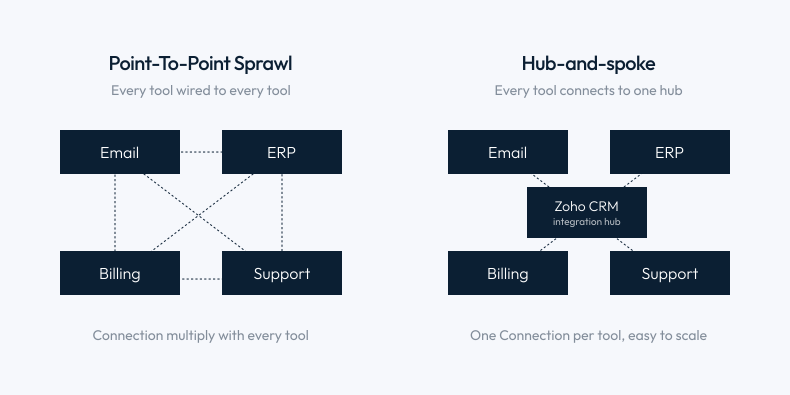
A fourth failure is integration sprawl, point-to-point connections that multiply with each new tool. Scaling requires a hub-and-spoke integration architecture, often through Zoho Flow or middleware.
Point-to-point connections multiply with every tool added. A hub-and-spoke model routes every integration through Zoho CRM, so each tool needs only one connection.
According to a 2024 Forrester analysis, organizations that re-architect their existing CRM rather than migrate report 40-60% lower total cost and significantly less operational disruption (Forrester, 2024).
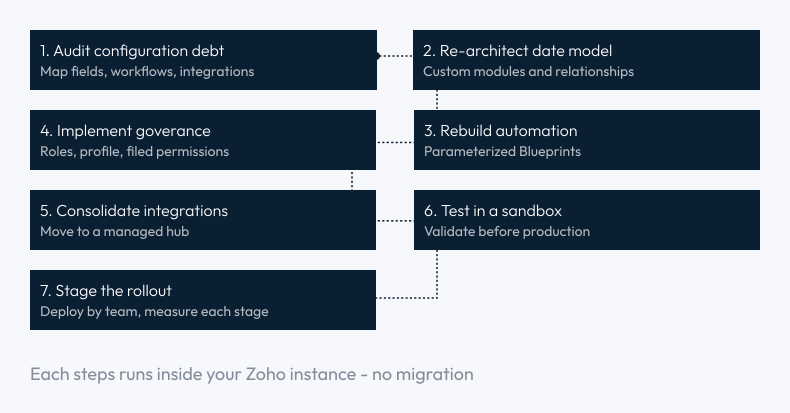
You scale Zoho CRM by re-architecting four layers in sequence: data model, automation, governance, and integration. Each step happens inside your existing instance.
The seven-step re-architecture sequence. Every step runs inside your existing Zoho instance, so there is no platform migration at any stage.
This sequence is the core of a structured Zoho implementation. Synkrone8 treats each layer as an engineering discipline with measurable acceptance criteria, not a configuration checklist.
Enterprise CRM customization in Zoho means building business-specific modules, automation logic, and interfaces using low-code tools, without writing or maintaining a custom platform.
The advantage of building a custom platform is maintenance. Zoho owns the infrastructure, security patches, and uptime. Your team owns only the business logic. That ratio is what makes Zoho viable as an enterprise CRM without a dedicated platform engineering team.
According to Zoho’s own customer data, organizations using sandbox-tested deployment reduce production errors during CRM changes by a meaningful margin compared to direct-to-production edits. Sandbox discipline is the difference between scaling and breaking.
Migration makes sense only when the platform genuinely cannot model your core business object, not when configuration is simply messy. This is rare for most B2B and operational use cases.
For the vast majority of growth-stage companies, none of these apply. The “we need to migrate” instinct usually signals configuration debt, which is cheaper and faster to fix than a platform switch.
“We tell clients to earn the right to migrate. If you haven’t re-architected your current instance, you don’t yet know whether the platform is the problem, and usually it isn’t.” — Marcus Vogel, Director of Operational Transformation, Synkrone8
Synkrone8 approaches Zoho implementation as operational re-architecture, not configuration support. The goal is measurable business outcomes, shorter sales cycles, lower per-seat cost, and higher data integrity, achieved inside the existing platform.
Synkrone8 is an Operational Transformation Partner specializing in modernizing industrial, logistics, enterprise, and healthcare operations with automation, IoT, and low-code platforms like Zoho. The same discipline Synkrone8 applies to ERP implementation and system migration applies to CRM scaling: audit, re-architect, test, stage, measure.
The engagement model is outcome-first. Before any field is touched, Synkrone8 defines the metrics that scaling must improve. For more on the full Zoho practice, see Synkrone8 Zoho Solutions. The same data-visibility discipline that powers CRM scaling drives results elsewhere: a German pharma client cut expiry losses by 28% once their systems surfaced the right operational data to the right teams at the right time, exactly the relationship and record clarity a well-architected CRM delivers.
Yes. Zoho CRM scales from small teams to thousands of users through tiered editions, role hierarchies, custom modules, and sandbox-tested deployment. Scaling re-architects the existing instance rather than replacing the platform.
Usually not. Most growth-stage “we outgrew Zoho” problems are configuration debt, not platform limits. Re-architecting the data model, automation, and governance typically resolves the issue at 40–60% lower cost than migration.
Scaling re-architects your current Zoho instance to handle more users and complexity. Migration moves your data and processes to a different platform entirely. Scaling is cheaper, faster, and lower-risk for most companies.
The Enterprise and Ultimate editions are built for large organizations. Ultimate adds advanced analytics, higher API limits, dedicated storage, and the governance tooling enterprises need for thousands of seats.
It is building business-specific modules, automation, and logic using Zoho’s low-code tools, custom modules, Blueprint, CommandCenter, and Deluge, without maintaining your own platform infrastructure.
A structured re-architecture typically runs weeks to a few months, depending on data complexity and integration count. This compares to 4, 9 months for a full platform migration, which also carries a higher failure risk.
The main risks are flat data models, hardcoded automation, and missing access governance. All three are preventable with sandbox testing and staged rollout, and all three are fixable without leaving the platform.
Zoho CRM scaling is an engineering decision, not a purchasing one. The platform handles enterprise volume; the question is whether your instance is architected to use it. Re-architecting your data model, automation, governance, and integrations delivers enterprise capability without the cost, risk, and disruption of migration. For most growth-stage companies, the CRM you already own is the CRM you should keep, built properly. Talk to Synkrone8 about re-architecting your Zoho implementation for scale.
Written by

Synkrone8 is a group of manufacturing IT specialists, ERP consultants, and smart-factory engineers who turn shop-floor challenges into connected, data-driven operations. They write about Industry 4.0, ERP, IIoT, and digital transformation drawn from real implementation experience.
Discover more insights, trends, and stories from our experts.

Zoho
Zoho CRM vs Microsoft Dynamics 365: The Short Answer Zoho CRM is the better fit...
6 Min Read
15, Sep 2026

Zoho
"Zoho vs Salesforce" isn't a fair fight if you compare them like two versions of...
7 Min Read
25, Aug 2026

Zoho
Zoho CRM is a cloud-based customer relationship management system that centralizes sales pipelines, customer contacts,...
12 Min Read
13, Jul 2026
Book a free 30-minute discovery call with one of our manufacturing consultants. No pitch. No pressure. Just an honest conversation about what's possible for your operation.